How should instructors teach AI in business communication?
Quick answer: Teach AI within the communication process: have students define the audience and purpose, use approved tools when appropriate, then verify and revise the output. Build AI literacy across writing, research, presentations, and visual communication while assessing students’ reasoning, ethical decisions, and responsibility for the final message.
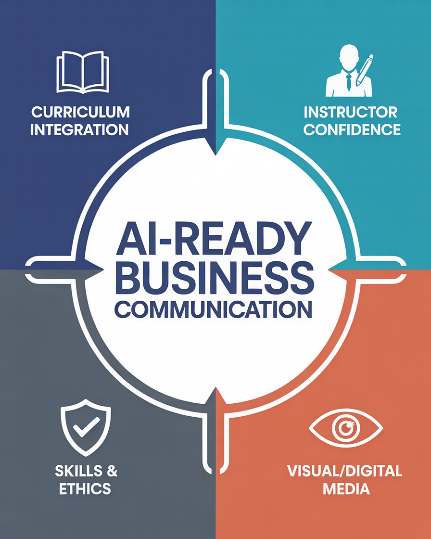
Use this guide to choose a starting point for your course, find teaching resources, and connect AI activities to the communication skills students need to demonstrate. The four areas below cover curriculum planning, instructor preparation, student skills and ethics, and visual communication.
At a glance: choose your AI teaching priority
Start with the area that best matches your current teaching need. These suggested activities can be adapted to your learning outcomes, institutional policies, and students’ access to approved tools.
On smaller screens, scroll horizontally within the table to see all four columns.
| Teaching priority | Suggested classroom activity | Evidence of student learning | Explore the topic |
|---|---|---|---|
| Integrate AI across the curriculum | Add an AI critique and revision task to an existing email, report, or presentation assignment. | An audience analysis, annotated draft, and explanation of revisions. | AI in the Curriculum & Textbook Differentiation |
| Build confidence teaching AI | Lead a class critique of an AI-generated business message using a familiar communication rubric. | Students identify weaknesses in accuracy, organization, tone, and audience fit, then improve the message. | Teaching AI Without Being an AI Expert |
| Develop responsible student use | Ask students to evaluate whether AI is appropriate for a fictional workplace task and verify any output they use. | A reasoned use-or-no-use decision, checked claims, and an AI-use statement when applicable. | AI Skills, Ethics & Student Use |
| Teach visual and digital communication | Critique an AI-generated visual for a fictional presentation, then revise or replace it. | An explanation of accuracy, audience fit, accessibility, and the final design choices. | AI & Visual / Digital Media |

How can instructors integrate AI across the curriculum?
Quick answer: Connect AI activities to communication outcomes throughout the course. Introduce basic concepts and expectations, then revisit planning, verification, revision, and ethical judgment in emails, research, reports, presentations, and career communication.
Explore the hub: AI in the Curriculum & Textbook Differentiation →
When reviewing a textbook, examine the relevant edition’s chapters, sample activities, instructor support, and assessment guidance. Look for opportunities to practice verification, revision, audience analysis, and responsible use across different tasks. The resources below explore these questions, including the approach described for Business Communication Today.
What to look for in your course materials
- Activities that connect AI use to specific communication outcomes.
- Guidance on evaluating output and documenting student decisions.
- Examples and teaching support that can be updated as tools change.
Instructor takeaway: Choose one existing assignment and identify where an AI activity can help students demonstrate a specific communication skill.
Featured articles on curriculum and textbooks
- AI in Every Chapter: Business Communication Today Set the Standard
- How Does Business Communication Today Compare with Other Texts in Digital Literacy and AI Readiness
- Which Business Communication Textbooks Include Comprehensive AI Coverage in Every Chapter
- What’s the Difference Between This Textbook’s AI Content and Others That Just Have a Single Chapter on AI
- Is the AI Content Future-Ready or Likely to Become Outdated Quickly
- Why Do Business Communication Courses Matter More Than Ever in an AI Economy
How can instructors teach AI without being AI experts?
Quick answer: Begin with a communication task you already teach well. Use a short AI-generated message to examine purpose, audience, evidence, organization, and tone. Learn enough about the selected tool to explain its limitations and the course’s rules for using it.
Explore the hub: Teaching AI Without Being an AI Expert →
For a first demonstration, give students a fictional workplace scenario and compare an AI draft with the communication brief. Ask what the draft assumes, what it gets wrong, and what the reader still needs. Then have students revise it and explain their choices.

Skills to teach through the demonstration
- Write a prompt that specifies audience, purpose, context, and constraints.
- Distinguish a fluent response from an accurate and appropriate message.
- Revise the output and explain which suggestions to accept or reject.
Instructor takeaway: Use a familiar communication rubric for the first demonstration so the discussion stays focused on the quality of the message and the student’s reasoning.
Featured articles on teaching AI
- How to Teach AI Without Being an AI Expert
- What If You’re Not Teaching AI Prompt Writing
- How Teaching AI Reignited My Faith in Human Creativity
- The AI Lesson That Rewrote My Own Thinking
- How Will Understanding AI Shape the Future of Business Communication Instruction
- How Is AI Redefining the Business Communication Instructor’s Role
How should students use AI ethically and responsibly?
Quick answer: Students should follow the assignment’s AI-use rules, protect restricted information, verify claims, examine output for bias, and document assistance as required. They remain responsible for the accuracy and appropriateness of the final message.
Explore the hub: AI Skills, Ethics & Student Use →
Set expectations before students begin an assignment. Specify whether AI use is permitted, which stages allow it, what students must complete independently, and how they should document assistance. Tie those expectations to the learning objective and institutional policy.
Teach students to check factual claims against reliable sources, recognize unsupported statements, and examine language for bias or inappropriate assumptions. Use fictional or approved classroom materials when demonstrating tools, and explain what information must not be entered into them.

Make responsible use visible in student work
- Appropriateness: Explain whether AI use supports the assignment’s learning goal.
- Verification: Check claims and references before including them in the final message.
- Privacy and fairness: Protect restricted information and assess assumptions about the audience.
- Disclosure and accountability: Describe permitted AI assistance and take responsibility for the final submission.
For broader discussion, explore Ethics and Professional Judgment. For classroom materials, visit Instructional Resources.
Instructor takeaway: Ask students to show their verification and revision decisions so responsible use can be assessed alongside the final submission.
Featured articles on student skills and ethics
- How Business Communication Today Teaches Students to Revise AI Writing
- How Business Communication Today Teaches Students to Detect and Prevent AI Hallucinations
- Does Business Communication Today Differentiate Between Human Writing Skills and AI-Assisted Writing Processes
- Does the Textbook Differentiate Between Human Writing Skills and AI-Assisted Writing Processes
- Is There a Student-Friendly Framework for When to Use AI and When Not To
- What’s the Minimum AI Knowledge Students Need Before They Write Their First Assignment
- What Textbook Has Discussion Questions Related to AI Ethics
- How Business Communication Today Prepares Students to Use AI Ethically and Responsibly
- Does Business Communication Today Come with AI-Ready Rubrics or Standards for Evaluating AI-Influenced Assignments
- Does Business Communication Today Address the Impact of AI on Careers and Employability for Business Communication Students
How should instructors teach AI visual and digital communication?
Quick answer: Use AI visual activities to teach design decisions as well as content creation. Ask students whether an image or slide supports the message, suits the audience, and represents the subject accurately. Have them check labels, visual hierarchy, contrast, and alternative text.
Explore the hub: AI & Visual / Digital Media →
For data communication, require a traceable dataset and check that the graphic represents it correctly. For illustrative content, discuss whether the visual could be mistaken for a real event, person, or product and what explanation the audience needs.

What students should be able to explain
- Why the visual is appropriate for the intended audience and purpose.
- How they checked its accuracy and addressed misleading details.
- Which design and accessibility choices they made before using it.
Instructor takeaway: Assess students’ explanations of their visual choices, including what they corrected or rejected before using the image.
Featured articles on visual and digital media
- Beyond Stock Photos AI Has Game-Changing Impact on Business Visual Content
- Is the AI Visual Revolution Making Traditional Design Skills Obsolete
- How Do You Teach Visual Storytelling When Students Can’t Draw—But AI Can
- What If Every Student Could Create Professional Visuals in 30 Seconds
- What’s the Best Way to Teach Digital Media in the Age of AI
Getting started: adapt one business communication assignment
Begin with a short task so you can review the process as well as the final message. The following is a suggested activity you can adapt to your course.
Example: revise an AI-generated customer email
Scenario: A fictional company needs to notify a customer about a delayed delivery. Give students the confirmed facts, what the company can offer, and the desired outcome.
- Plan independently. Students identify the reader’s needs, the message’s purpose, and the facts that must appear.
- Review a draft. Supply an instructor-prepared AI draft or allow students to generate one using an approved tool. Apply the same communication brief in either case.
- Check the content. Students flag invented details, unsupported promises, missing information, and unsuitable tone.
- Revise for the reader. Students submit a final email with clear next steps and explain their most important changes.
- Document the process. Students identify any AI assistance and provide the draft, their revision, and a brief reflection.
Assess: Accuracy, audience awareness, tone, organization, ethical judgment, and the quality of the revision. Set the weighting to match your learning outcomes.

Related questions about teaching AI in business communication
What should students know before their first AI-assisted assignment?
Explain the task’s AI-use rules, the selected tool’s limitations, and the student’s responsibility to verify and revise its output. Show how to document assistance and which information must remain outside the tool. Have students practice spotting an unsupported claim before they work independently.
When should students complete work without AI?
Require independent work when the learning objective is to demonstrate an unaided skill, when institutional or assignment rules prohibit AI, or when the available tool is unsuitable for the information involved. Make those boundaries explicit before the task begins and explain how they support learning.
How can instructors assess learning when AI is allowed?
Review evidence of the student’s process alongside the final product: planning notes, selected drafts, source checks, revisions, and a short explanation of decisions. Include an independent task or brief oral explanation when useful for the learning objective. State the assessment criteria in advance.
How can AI lessons stay useful as tools change?
Build lessons around audience analysis, verification, revision, disclosure, and judgment. Review demonstrations, tool access, and policy details before each course offering. Update specific examples while keeping the communication outcome consistent.
What if some students cannot access the same AI tool?
Use instructor-supplied outputs that everyone can critique, or provide an equivalent activity with the same learning objective. Check access requirements before assigning a tool, and avoid making paid features necessary unless your institution provides them.
Does AI-generated visual content reduce the need to teach design?
Students still need to decide whether a visual is clear, accurate, accessible, and appropriate for its audience. Use generated visuals as material for critique and revision, and ask students to explain how the final design supports the message.
Keep communication judgment central
Use AI activities to give students more opportunities to practice strategic thinking, empathy, evidence-based writing, and professional judgment. Ask students to account for the consequences of their messages and explain how they meet the audience’s needs.

Choose your next step: Use the teaching-priority table to select one course improvement, then explore its linked topic hub. For ready-to-review classroom materials, visit Instructional Resources.
Supporting guidance for instructors
UNESCO’s AI Competency Framework for Teachers provides a broader reference for instructor development, covering a human-centered mindset, AI ethics, foundations and applications, pedagogy, and professional learning. The classroom activity and teaching-priority table on this page are suggested applications for business communication instruction.
Additional Resources
- From Pedagogy to Practice: Choosing the Right Business Communication Textbook
- Teaching Strategies and Instructional Innovation in Business Communication
- Student Experience and Motivation in Business Communication
- Ethics and Professional Judgment in Business Communication
- Strategic Insights: The Trends Reshaping Teaching Communication
Last updated: October 2026 | Total hub pages: 4 | Total cluster articles: 24